


Paper Calendar
📅
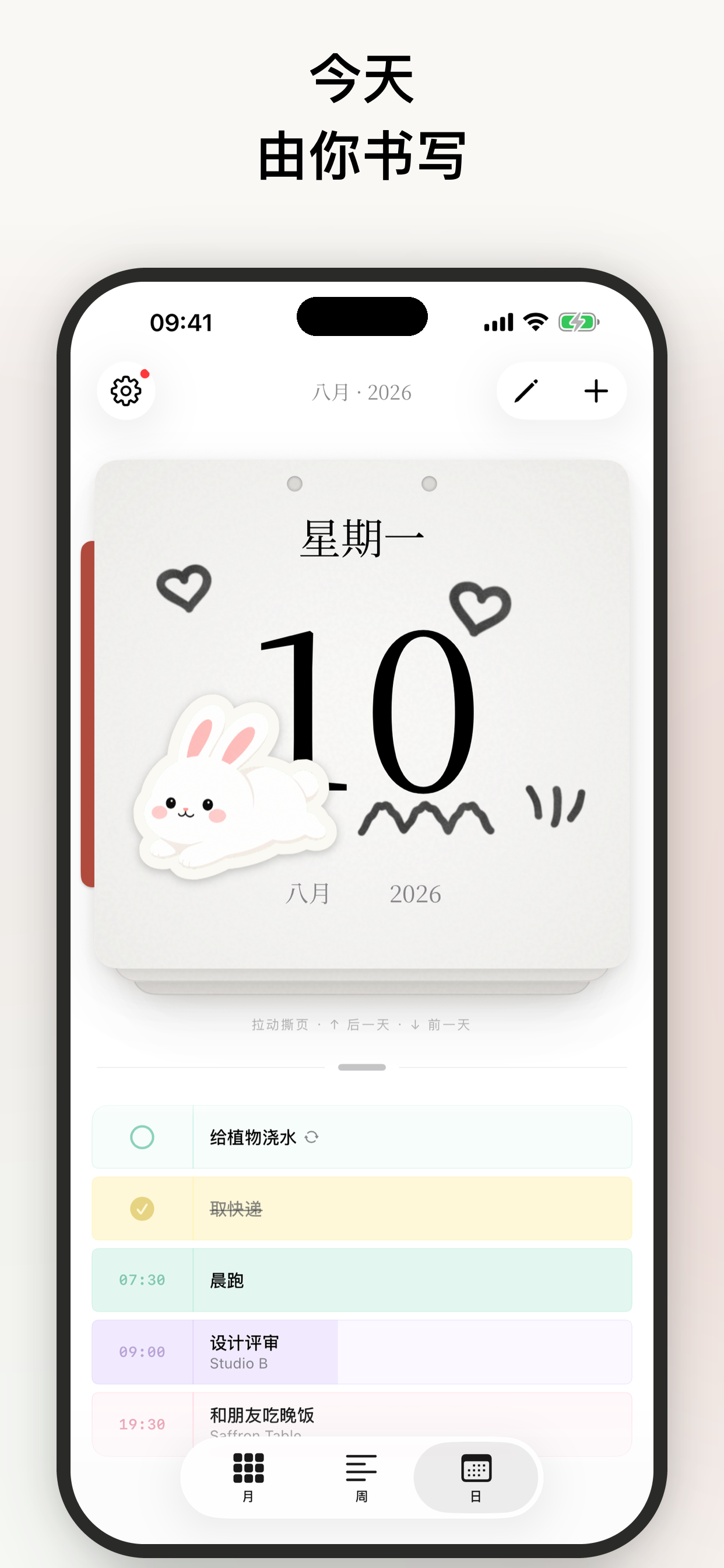
One sheet per day, gently swipe and tear off today's page



🏷️ Paper-like feel / Highly customizable / Hand-drawn diary✅ iPhone / iPad🇩🇪 German developer📱"Hibi Planner Calendar" Developer:"Most digital calendars are already set in stone bef...
One sheet per day, gently swipe and tear off today's page
Doodle and write on paper, supporting Apple Pencil
Extract the main subject from a photo to create a custom sticker
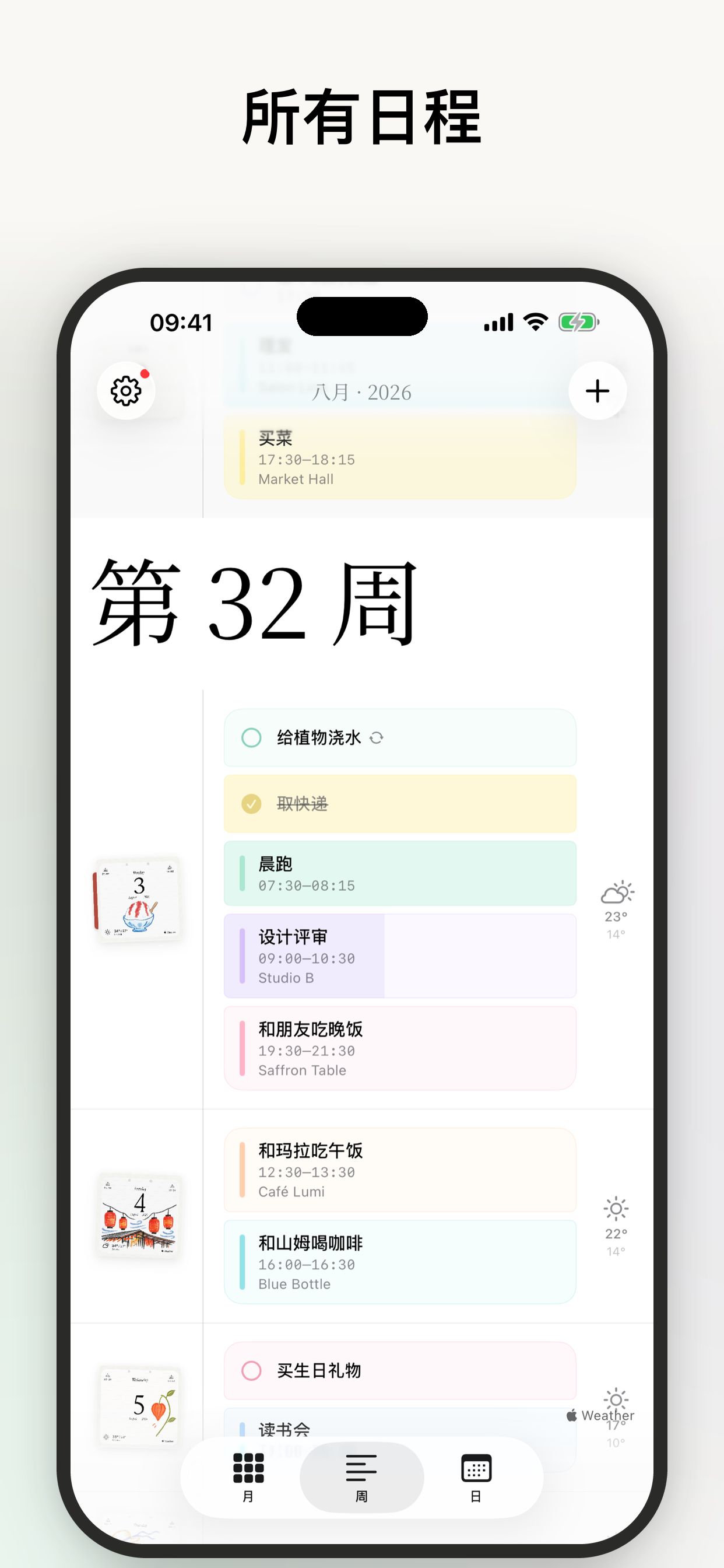
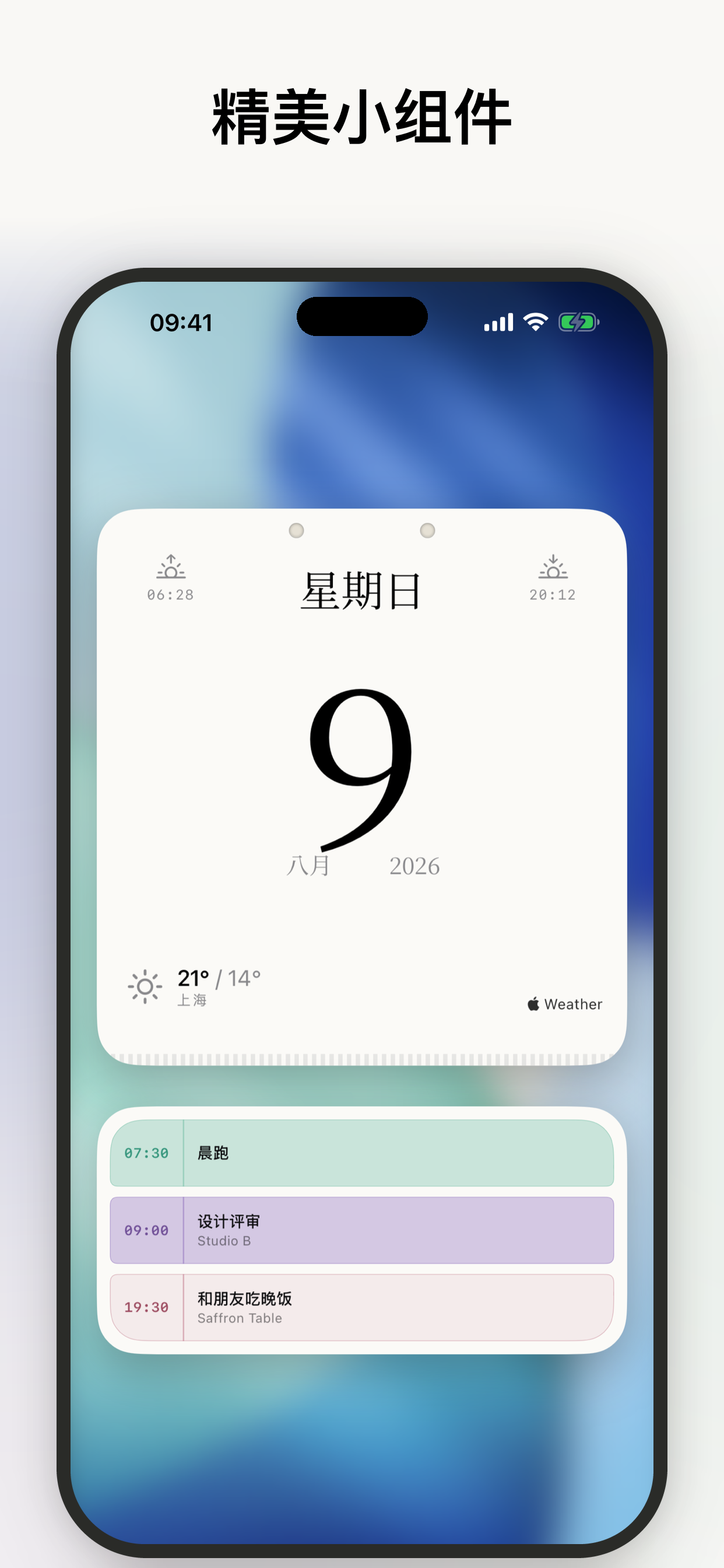
Hibi is a highly customizable daily planner and calendar app for iPhone and iPad. It transforms the events and reminders you normally store in Apple Calendar into separate pages fo...
One sheet per day, gently swipe and tear off today's page
Doodle and write on paper, supporting Apple Pencil
Extract the main subject from a photo to create a custom sticker
🏷️ Paper-like feel / Highly customizable / Hand-drawn diary
✅ iPhone / iPad
🇩🇪 German developer
📱"Hibi Planner Calendar" Developer:"Most digital calendars are already set in stone before you even open them; they decide what a day should look like, and all you can do is add events into it. But paper planners are completely different: people choose their paper, write in the margins, draw, paste stickers, and slowly create something that reflects their life. I wanted to bring that freedom into a calendar that still uses the schedules you already have on your iPhone. This is Hibi."
🎯The most artisanal feature of "Hibi Planner Calendar" is day-by-day customization:
📋 Other feature highlights:
📜 More product background:
Hibi's name comes from the Japanese word "日々" (hibi), meaning "day after day." Developer Alex is a German independent iOS developer currently residing in Osaka, Japan. Hibi is an independent project entirely designed, developed, tested, and promoted by him alone.
The biggest challenge during development was keeping highly customized pages smooth and reliable. A single page might simultaneously contain textured paper, calendar events, reminders, weather, ink strokes, text, stickers, and tape, requiring seamless animations during swiping and tearing, correct display in widgets, and private syncing via iCloud. As he puts it, he spent an "unreasonably long time" adjusting tiny shadows, textures, gestures, and haptic feedback.
In the future, he hopes to further deepen customization capabilities: better creation and organization of stickers and tapes, richer paper and drawing options, and bringing more customized pages to home screen widgets. He also wants to make past days easier to review and share, allowing the calendar to become increasingly personal through use rather than turning into a complex design tool. In the longer term, if he can make it feel natural on Mac, he intends to bring Hibi to macOS as well.
✨ Summary:If you want the convenience of a digital calendar but don't want every day to look identical, Hibi is likely just the right answer. It doesn't pressure you to keep streaks; it quietly hands the days back to you, page by page.
74 enthusiasts have claimed
10.0 Rating 界面简洁大方,内容丰富。很苹果风

 2 screenshots
10.0 Rating 可以自己涂鸦设计日历排版很有趣,可以变换的东西很丰富。不过滑动的时候感觉有点卡。

 2 screenshots
10.0 Rating 第一次打开Hibi手帐日历的时候,第一感就是:这也太有纸质手帐的感觉了吧! 平时我只要用手机记录日程,但传统的日历app总觉得比较工具化,打开就是一堆文字和安排。Hibi给我的感觉完全不一样,它把每天设计成一张纸,可以像翻手帐一样查看自己的日程,轻轻划动还有类似“撕下纸业的效果,整个过程很有仪式感。 整体来说,Hibi并不是那种功能复杂,什么都想做的日程管理工具,它更倾向于日历+手帐+生活记录。目前体验下来,我最喜欢它没有把“效率”做的很紧张,而是让每天的日程多了一点温度。

8.0 Rating 这款手账日历,模拟纸卡翻页,支持Apple Pencil手绘、贴纸,可联动系统日历,iCloud同步,无广告无强制打卡。但高级贴纸、小组件等功能需要买断解锁,复杂日程管理不太方便,提醒目前无法设置重复,适合喜欢轻手账、偏爱手绘记录的用户。


 3 screenshots
9.0 Rating 打开界面非常简洁干净,布局很舒服,日系小清新风格的手账app,用起来很上手,就是功能有点单一,希望这款软件能越做越好啦ദ്ദി(˵ •̀ ᴗ - ˵ ) ✧

 2 screenshots
Exclusive Giveaways in progress today 98 items. Keep browsing to see if the next one is what you're looking for.
 效率

Supports multi-device synchronization and custom templates, providing one-stop management of target progress
 笔记日记

Discover the growth changes in your child's photos · Growth stories and a photo album of time
 笔记日记

Cherish the space and life memories
 摄影设计

Camera photos with GPS correction, relive your travel footprints, supports GPX
 专注习惯

Habits, To-Do Lists, Memos, and Countdowns
 效率办公

100% offline, no full access required
 效率办公

Cats accompany you to stay focused, using calendars and plans to manage time
 运动健康

Relaxing Woodfish and Piano | Watch Faces | Stress Alerts | Breathing Relaxation | Heart Rate & Blood Oxygen | Stress Relief


🏷️ Paper-like feel / Highly customizable / Hand-drawn diary
✅ iPhone / iPad
🇩🇪 German developer
📱"Hibi Planner Calendar" Developer:"Most digital calendars are already set in stone before you even open them; they decide what a day should look like, and all you can do is add events into it. But paper planners are completely different: people choose their paper, write in the margins, draw, paste stickers, and slowly create something that reflects their life. I wanted to bring that freedom into a calendar that still uses the schedules you already have on your iPhone. This is Hibi."
🎯The most artisanal feature of "Hibi Planner Calendar" is day-by-day customization:
📋 Other feature highlights:
📜 More product background:
Hibi's name comes from the Japanese word "日々" (hibi), meaning "day after day." Developer Alex is a German independent iOS developer currently residing in Osaka, Japan. Hibi is an independent project entirely designed, developed, tested, and promoted by him alone.
The biggest challenge during development was keeping highly customized pages smooth and reliable. A single page might simultaneously contain textured paper, calendar events, reminders, weather, ink strokes, text, stickers, and tape, requiring seamless animations during swiping and tearing, correct display in widgets, and private syncing via iCloud. As he puts it, he spent an "unreasonably long time" adjusting tiny shadows, textures, gestures, and haptic feedback.
In the future, he hopes to further deepen customization capabilities: better creation and organization of stickers and tapes, richer paper and drawing options, and bringing more customized pages to home screen widgets. He also wants to make past days easier to review and share, allowing the calendar to become increasingly personal through use rather than turning into a complex design tool. In the longer term, if he can make it feel natural on Mac, he intends to bring Hibi to macOS as well.
✨ Summary:If you want the convenience of a digital calendar but don't want every day to look identical, Hibi is likely just the right answer. It doesn't pressure you to keep streaks; it quietly hands the days back to you, page by page.

10.0 Rating 界面简洁大方,内容丰富。很苹果风
2 screenshots

10.0 Rating 可以自己涂鸦设计日历排版很有趣,可以变换的东西很丰富。不过滑动的时候感觉有点卡。
2 screenshots

10.0 Rating 第一次打开Hibi手帐日历的时候,第一感就是:这也太有纸质手帐的感觉了吧! 平时我只要用手机记录日程,但传统的日历app总觉得比较工具化,打开就是一堆文字和安排。Hibi给我的感觉完全不一样,它把每天设计成一张纸,可以像翻手帐一样查看自己的日程,轻轻划动还有类似“撕下纸业的效果,整个过程很有仪式感。 整体来说,Hibi并不是那种功能复杂,什么都想做的日程管理工具,它更倾向于日历+手帐+生活记录。目前体验下来,我最喜欢它没有把“效率”做的很紧张,而是让每天的日程多了一点温度。
Exclusive Giveaways in progress today 98 items. Keep browsing to see if the next one is what you're looking for.
效率
Supports multi-device synchronization and custom templates, providing one-stop management of target progress
笔记日记
Discover the growth changes in your child's photos · Growth stories and a photo album of time
笔记日记
Cherish the space and life memories
Copy the code below and send it in the Mergeek WeChat Official Account chat box
to check the activity status,Claim Redemption Code。

Your activity participation record has been saved. You can return to the Official Account to continue checking the redemption status.
Hibi Planner Calendar
0 Gems
--
--
The redemption code will be sent via the Mergeek WeChat official account.
We recommend pinning the 「Mergeek」 WeChat official account and ensuring message notifications are not muted, so you can receive redemption code alerts promptly.
You can also check the current status in the 'Personal Center'.
--
Please scan the QR code within 24 hours to visit the Mergeek WeChat official account and send the code to check the activity status.
Some app store links cannot be opened directly within the mini program. Please long-press and scan the QR code below, go to the Mergeek WeChat official account, and automatically obtain the download link for this product.
More convenient on mobile


